How to Choose a Waterproof LED Screen?
Choosing a Waterproof Led Screen is more than selecting a bright cabinet for outdoor use. Rain, dust, heat, salt air, and maintenance access can determine whether the display performs reliably or fails early. Grand View Research’s LED Display Market Size, Share & Trends Analysis Report identifies outdoor applications as an important growth area. MarketsandMarkets also forecasts continued expansion in the global LED display market, driven by advertising, sports, transport, and public information systems. These trends make careful specification increasingly important.
Start with the environment, not the screen size. IEC 60529 ratings provide a useful technical reference. An IP65 enclosure resists dust and water jets, while IP66 offers stronger protection against powerful water jets. Neither rating means permanent submersion. Check both front and rear protection. A screen beside a swimming pool faces different risks from one installed under a covered stadium roof.
Brightness matters too. Direct sunlight may require approximately 5,000 to 7,000 nits, depending on viewing distance and local conditions. High brightness can increase heat and energy consumption. Pixel pitch, refresh rate, cabinet sealing, drainage, power supply quality, and corrosion resistance deserve equal attention. The U.S. Department of Energy’s LED Lighting Facts resources also emphasize efficiency, thermal management, and product verification, although display specifications require additional evaluation.
This guide compares these factors in practical terms. It also questions common sales claims. IP numbers alone are not enough. A poorly sealed cable can still stop the show. Product tests, installation records, warranty terms, and independent certifications should support every purchase decision. Some recommendations may remain imperfect, because climate, budget, and maintenance capability vary widely. That is precisely why careful inspection matters.
What Makes an LED Screen Waterproof?
Choosing a waterproof LED screen starts with understanding what waterproof really means. It does not always mean full submersion. Most outdoor displays rely on an IP rating, which measures resistance to dust and water. A higher rating usually offers stronger protection, but installation still matters.
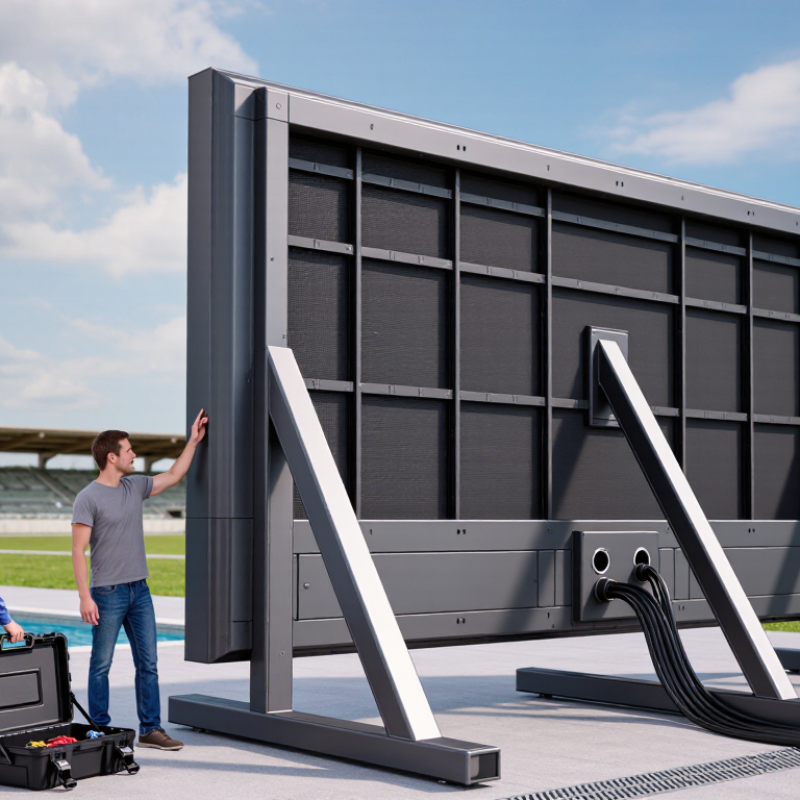
The enclosure should have sealed joints, covered modules, and protected cable connections. Drainage channels are equally important. Trapped water can damage internal circuits, even when the front panel appears sealed. In field installations, technicians often inspect rubber gaskets for cracks or compression loss. Small gaps become serious problems during heavy rain.
IP65 is common for outdoor LED screens, but the front and rear may have different ratings. Always check both sides. The power supply and control cabinet also need suitable protection. A screen can fail because of an exposed connector, not a faulty LED module. This detail is easy to miss.
Look for corrosion-resistant materials and conformal protection on sensitive circuit boards. Ask whether the screen has passed spray, humidity, and temperature tests. Testing should match the planned environment, including coastal air or freezing winters. No seal lasts forever. Regular inspections remain necessary. In my experience, maintenance access is often overlooked during selection. A screen that is difficult to open may be protected today, but expensive to repair later.
How to Choose a Waterproof LED Screen?
What Makes an LED Screen Waterproof?
IP ratings are defined by IEC 60529. The second digit indicates protection against water. A higher digit generally means the enclosure has passed more demanding water-ingress tests, but the exact test conditions should always be checked with the manufacturer.
- IP54: Protection against water splashes from any direction.
- IP65: Protection against water jets from any direction; commonly used for outdoor LED displays.
- IP66: Protection against powerful water jets.
- IP67: Protection against temporary immersion, typically up to 1 metre for up to 30 minutes.
- IP68: Protection against continuous immersion under conditions specified by the manufacturer.
For an outdoor LED screen, verify both the front and rear IP ratings, sealing quality, drainage design, cable protection, and resistance to temperature changes before installation.
How to Match Waterproof Ratings to Installation Conditions
How to Choose a Waterproof LED Screen?
How to Match Waterproof Ratings to Installation Conditions
Start by studying the installation environment, not just the product label. An indoor lobby needs less protection than an exposed stadium wall. For outdoor rain, look for an enclosure tested against dust and water jets. IP65 is often suitable for general rain exposure. IP66 offers stronger protection against forceful water. IP67 covers temporary immersion, but it does not automatically replace proper drainage.
Check both the front and rear of the screen. Rain may strike the display directly, while wind pushes water through cabinet gaps and cable connections. Coastal sites also add salt, which can attack metal parts and seals. Ask for test documentation based on IEC 60529, and confirm how the rating applies after installation. A certified rating can still fail when cables, doors, or ventilation panels are fitted poorly.
Think about maintenance, heat, and condensation too. A tightly sealed cabinet may resist water but trap heat under strong sunlight. That can shorten component life. Drainage channels and correctly sealed cable glands matter greatly. I have seen screens with excellent ratings develop moisture problems because installers ignored water pooling behind the cabinet. Higher is not always better. Match the rating to real exposure, inspect the weakest connection, and question any specification that lacks testing details. The choice may remain imperfect. That is normal.
Which Screen Materials and Sealing Features Matter?
How to Choose a Waterproof LED Screen?
Screen materials and sealing details decide whether an outdoor LED display survives real weather. According to IEC 60529, an IP65 enclosure is dust-tight and resists water jets. IP67 also allows temporary immersion up to one metre. These ratings describe tested conditions, not unlimited protection.
Choose a cabinet made from corrosion-resistant aluminum, with a durable powder coating. The front mask should resist UV exposure and repeated temperature changes. Silicone gaskets need even compression around modules, doors, and service panels. Loose seals create tiny paths for rain. Cable glands matter too. A strong cabinet can still fail through one poorly sealed connector.
Tips: Ask for the complete assembled cabinet’s IP test report, not only a module certificate. Check whether testing covered the front, rear, seams, and cable entries. UL Solutions and IEC guidance both emphasize evaluating the finished enclosure. Look for drainage channels and pressure-equalization features, especially in climates with hot days and cold nights. A higher IP number is not automatically better. It may restrict ventilation and increase condensation risks. I have seen displays rated for rain but installed with exposed cable loops. The rating looked convincing; the installation was not. Recheck seals after maintenance, because one missing screw can change the result.
How to Select Brightness, Resolution, and Viewing Distance
How to Choose a Waterproof LED Screen?
Brightness should match the installation environment, not simply the product’s maximum rating. Outdoor screens commonly require about 5,000–8,000 nits in direct daylight. At night, 300–1,000 nits is often more comfortable. The Outdoor Advertising Association of America’s Digital Billboard Guidelines support ambient-light control instead of one fixed brightness value. CIE 150:2017 also highlights glare management near roads and buildings. Measure the screen with a luminance meter. Datasheet figures can be optimistic.
Resolution depends on pixel pitch and viewing distance. A practical field rule is one millimeter of pixel pitch per meter of minimum viewing distance. For example, a 4 mm screen can appear acceptable from roughly four meters away. A more comfortable distance is often two to three times farther. This is not a strict engineering law. Small text, maps, and product details need a finer pitch. The screen may look sharp from the sidewalk but weak across a wide plaza.
Do not ignore waterproof protection. IEC 60529 defines IP ratings, but an IP65 front does not guarantee safe installation. Cable joints, drainage, and rear ventilation still matter. Brightness also changes with weather, glass reflections, and dust. I would test content outdoors before ordering. That step feels slow. It can prevent an expensive mismatch between resolution, brightness, and real viewing distance.
How to Choose a Waterproof LED Screen: Brightness, Resolution, and Viewing Distance | Application Environment | Recommended Brightness | Suggested Pixel Pitch | Approximate Minimum Viewing Distance | Recommended Comfortable Viewing Distance | Recommended Waterproof Rating | Selection Notes |
| Indoor or fully shaded area | 800–1,500 nits | 1.5–3 mm | 1.5–3 m | 2.5–5 m | IP30 or higher | Choose moderate brightness to avoid glare and unnecessary power consumption. |
| Outdoor area with permanent shade | 2,500–4,000 nits | 3–5 mm | 3–5 m | 5–8 m | IP65 front; IP54 or higher rear | Suitable for covered walkways, building entrances, and shaded outdoor advertising. |
| Outdoor area with partial sunlight | 4,000–5,500 nits | 4–6 mm | 4–6 m | 6–10 m | IP65 front and rear | Use automatic brightness control when lighting conditions change during the day. |
| Outdoor area exposed to direct sunlight | 5,500–7,000 nits | 5–8 mm | 5–8 m | 8–14 m | IP65 front and rear | Higher brightness improves daylight readability but increases heat generation and energy use. |
| Large roadside or stadium display | 6,000–8,000 nits | 8–16 mm | 8–16 m | 12–25 m | IP65 front and rear | A larger pixel pitch is normally acceptable because viewers are farther away. |
| Coastal, high-humidity, or heavy-rain location | 5,000–7,000 nits | 4–10 mm | 4–10 m | 7–16 m | IP65 front and rear; corrosion-resistant construction preferred | Consider sealed connectors, drainage, ventilation, and protective coatings for electronic components. |
Pixel Pitch and Resolution Reference | Pixel Pitch | Approximate Pixel Density | Typical Minimum Viewing Distance | Typical Use | Image Detail and Content Suitability |
| 1.5 mm | Approximately 444,000 pixels/m² | About 1.5 m | Close-view indoor displays, control rooms, premium presentation areas | Very fine detail; suitable for text, charts, video, and close-up viewing |
| 2.5 mm | Approximately 160,000 pixels/m² | About 2.5 m | Retail spaces, conference rooms, indoor stages | Clear text and detailed video at short to medium distances |
| 4 mm | Approximately 62,500 pixels/m² | About 4 m | Outdoor entrances, commercial facades, medium-size events | Good balance between image quality, viewing distance, and cost |
| 6 mm | Approximately 27,800 pixels/m² | About 6 m | Outdoor advertising, plazas, transportation areas | Suitable for video, graphics, and large text viewed from a distance |
| 8 mm | Approximately 15,600 pixels/m² | About 8 m | Large outdoor signs, stadium perimeters, roadside displays | Best for large images, bold text, and content viewed from medium or long distances |
| 10–16 mm | Approximately 3,900–10,000 pixels/m² | About 10–16 m | Large billboards, stadium screens, long-distance viewing | Economical for large-format content where fine detail is not required |
Practical Selection Rules | Selection Factor | Recommended Rule | Why It Matters |
| Viewing distance | As a general planning rule, the pixel pitch in millimeters is approximately equal to the minimum viewing distance in meters. | A smaller pixel pitch provides sharper images at close range, while a larger pitch is more suitable for distant viewers. |
| Resolution | Calculate total resolution from screen width and height divided by the pixel pitch. | Higher resolution improves text readability, fine graphics, and close-up video quality. |
| Brightness | Match brightness to ambient light rather than selecting the highest available value. | Excessive brightness can cause glare, increase power consumption, and shorten component life. |
| Waterproofing | For exposed outdoor installations, use at least IP65 on the front and preferably IP65 on the rear. | The first IP digit indicates protection from solids and dust; the second indicates protection from water. |
| Refresh rate | Choose at least 1,920 Hz for general video and preferably 3,840 Hz or higher for camera-recorded events. | A higher refresh rate helps reduce visible flicker and scanning lines in photographs and video recordings. |
| Automatic brightness | Use a light sensor or scheduled brightness control for outdoor screens. | It maintains readability in changing light while reducing nighttime glare and energy use. |
| Installation conditions | Check drainage, airflow, wind load, ambient temperature, maintenance access, and power capacity. | Waterproofing alone does not eliminate risks caused by condensation, heat, wind, or improper installation. |
Note: Brightness and viewing-distance values are practical planning ranges. Final specifications should be confirmed using the site’s measured ambient light, screen dimensions, content type, local weather conditions, and installation structure.